Social Icons

twitterfacebookgoogle pluslinkedinrss feedemail
Showing posts with label Blogger Money. Show all posts

Search Engine Optimization (SEO) Tips

It will take a while to get a decent amount of traffic from the search engines. The search engines do not like NEW websites. They like more established sites that have a lot of people linking to them, hence proving that they are reputable. This is why getting links from other bloggers, directories, other web sites that have a good reputation in the search engines’ eyes is very important. As your blog begins to grow by having more pages and more links the search engines will begin to send you more and more traffic. This is a good thing!! But, as I mentioned earlier, they are very wary of new websites – so time will be your ally when it comes to the search engines.

Search Engine Optimization (SEO) is an science/art (depending on who you ask) that focuses on getting your website or blog to the top of the search engine listings. Being at the top of Google’s results for any decent keywords can be a great source of traffic and the greatest part about it is that it is FREE TRAFFIC!!!
I am not going to get deep into SEO much here, there are far more thorough books about it  but as your blog grows you should try to learn more about it, as it will only help you by knowing more. Just like most of the things you will learn while blogging, you don’t need to be an expert at it – just having a working knowledge will provide great results.

The thing to remember about the search engines (especially Google) is that they are trying to create a perfect system where any searcher can find exactly what they want. Google wants to display the most relevant websites to their searchers. They will never have a perfect system, but they probably won’t stop trying. If you can keep this in mind, it will be very helpful when you are trying to optimize your blog. Don’t waste your time trying to trick them, they will figure it out and will punish you for it. Just focus on making it very clear to them what your site is all about and writing great content for your reader and the rest will take care of itself.
So, let’s get to some SEO. These are some of the most important (in my opinion) pieces of SEO that every beginner should know. If you do these right, you will be much better off than most people who don’t know anything about SEO.

1. Title Tags

This may be the single most important part of on-page SEO. The title tag of your website is what shows up in the top of your browser window. It is also one of the most important determining factors that the search engines use to determine what your site is about.


In the above picture you can see that the title tag is “Christian Personal Finance – Financial help, debt help…” You WILL want to make sure that your title tags contain the keywords that you want to rank for in the search engines. If your site is about rock climbing, you will not want to have “welcome to Bill’s blog” in the title tags. Something better would be “Rock climbing 101 | the best rock climbing techniques”

2. Anchor Text

Anchor text – the text that people use when linking. For instance, if I created a link for a great search engine you can see that the link will go to Google. “great search engine” is the anchor text. The anchor text is a big deal, because it tells the search engines what other sites say your site is about. Google really places a lot of importance on what words are in the anchor text. Obviously, you will not be able to control how other people link to your site all of the time. But, for those times that you can, you should use your keywords when possible. Linking to other pages and posts on your website, directory submissions, blog carnivals, and your signature line in forums all may be good places to make sure you get your keywords in your anchor text.

3. Keyword Research

If you are trying to get traffic from search engines, it is always a good idea to know what people are searching for before you start writing. I often use Aaron Wall’s keyword tool and run some keyword ideas through it to get estimates of how many people are searching for them.

4. Get links

We already lightly discussed the importance of links coming into your blog. Other that the great benefit they play in improving your search rankings, they also send visitors to your site. It is an obvious benefit, but often overlooked by people focusing on SEO. If you get a link from a blog that gets a lot of visitors, you could see a huge traffic spike from it. If you get links from lots of blogs, you could and will see visitors coming from most of them. Maybe not a bunch, but as you get more and more links, you will see more visitors coming. The bottom line about link-building is that you have to create something great that people want to link to. If you can consistently do that, many other things will fall into place.

Need more?

This is really just scratching the surface of SEO, and honestly if you really want to do well with it I would suggest hiring someone to help you with it.

ShareAsale Affiliate Program Review: Earn Affiliate Income

ShareAsale Affiliate Program Review: Earn Affiliate Income

Do you want to earn from your blog from this very moment?
I am damn sure AdSense isn’t making up your coffee prices as well.
Are you looking for a blog revenue program better than AdSense?
If you just nodded your head to say “um hmm” all the three times, this post is for you.
In this post, I am going to show an effective blog monetization technique that is often under the radar because the big bloggers using this won’t want you to know this.

Blogging is for sure a passion for many of us. But let’s face it, you cannot stick to your passion and give it full time unless it is the source of your bread and butter. But what if your blog has no decent traffic and or is not yet approved by AdSense?
Here is a source that accounted for almost 40% of my earnings in December 2014, an approx. of 470$/ BDT. 36190.00 (I know it’s not huge but is enough for many.) I don’t believe in eating up my blogs estate or in decreasing my readers UX with serving cheap ads. It’s when I started using this program.
Although I use various noticeable monetization programs to monetize BloggerTipsTricks which includes:
  1. Direct ads (See advertise page)
  2. Sponsored reviews
  3. Blog Services
  4. Affiliate Marketing etc.
but Affiliate marketing worked best for me last month. I don’t brag about my earnings in general but I am showing my screenshots here, because I know it can motivate someone reading this to make even more money. I myself joined shareasale after I saw the earnings report of a popular blogger.
Here are a few screenshots that prove my claims:
shareasale income proof
Note: $155.98 is finalized payment of month November 2014 which I received on Dec 20th 2014 and I made over $470 in Dec 2014 which I will receive this month i.e. Jan 2015.

How you can also make Money from your blog?

The program that accounted for 40% of my income in Dec 2014 is ShareAsale. Shareasale is an affiliate program that pays you to promote the products registered with them. It is a two way program in which merchants register their products on the platform and affiliate marketers like me and you sign up to promote these products and get paid for each sale made. Read these basics of affiliate marketing before you get started.

Why I recommend shareAsale

There are many great marketplaces like Commission Junction, Clickbank etc. from where internet marketers can pick and promote the products that suits to their blog audience but the reasons I recommend to use Shareasale are:
  1. Shareasale has a very user friendly and easy to use interface.
  2. You can sign up for almost any product you want. Products range from genesis themes to many fortune 500 businesses.
  3. Pay Per Sale and Pay Per Lead both type of programs are available there. Few programs pay 2 Tier commission too.
  4. The main reason is I am using it and making a good amount of dollars, and I know you too can do it.

Who can join Shareasale Affiliate Program?

Anyone can join shareasale, you only need to have a medium to reach your audience to sell them. If you have a blog, no matter in which niche, you can join shareasale. ShareAsale has a wide range of products you can choose to promote. Here is the list of few of the products/services you can start promoting right away based on your blog niche:
  1. Technology: Alishell LLC
  2. Blogging: StudioPress, WPEngine, Hootsuite
  3. Clothing and fashion: Eczosplay, Mart of China
  4. Food and fitness: Pregprep, World Genetics Nutrition
  5. Dating: Quality blooms, cards
  6. Books publishing: Blurb
  7. Weddings: Ybridal etc.

How to use shareAsale: A complete user guide

While using shareasale is not very cheesy, I am presenting you a guide to use shareasale as easily as possible.
STEP 1: Signing up:
    1. Go to Shareasale.com
welcome to sharesale
    1. You will be guided through five steps that are pretty self-explanatory. After completion of the sign up process, you will have to wait for confirmation and account approval.
shareasale affiliate signup
  1. If you use an email id from the domain of a site you are going to promote it (like: example@domainname.com), then it is approved fast, however you can sign up with a simple email service like Gmail, or outlook id.
  2. If you have signed up from a normal email id, you need to confirm that you own your website.
STEP 2: Confirmation and account approval:
Confirming can be done easily by either clicking an approval link sent to the email address registered with the domain or by placing a custom text code between the <head> and </head> section of your website template.
STEP 3: The dashboard:
The dashboard is as easy to navigate as it could be.
    1. The first thing you notice is a to-do-list that enables you to find what incomplete tasks you need to perform.
to do list
    1. In the given screenshot, I need to confirm my tax details as well as verify my website as I have signed up through my Gmail account which is no harm.
    2. Shareasale supports direct transfer of balance to the banks of many countries including India, so if you are from one of countries that comply with their payment norms you can get the affiliate commissions from shareasale deposited directly to your bank account.
shareasale bank form
  1. In the above form you just have to insert your bank name, city, your IFSC code of the bank, and your account number that’s it.
  2. The threshold payment for shareasale is 50$ only. This is easily attainable by any blogger. Sometimes a single sale makes more than 100$ alone. The payment is made on 20th of each month.
  3. You can check out your earnings daily.
STEP 4: Getting started WITH SHAREASALE AFFILIATE NETWORK:
    1. For new publishers (we, the affiliate marketers) we have the merchants section where you can hunt the top merchants (the companies whose products will be promoted by you).
search for merchants
    1. You can then sign up for the merchants individually; if there products interest you to promote them.
join program
    1. Some affiliate products require a confirmation from the merchant in order to enable you to promote it.
      For example – Hootsuite, Hootsuite pays a pretty good recurring commission on every sign up and I was interested and decided to join it. Now when I signed up for the product, I had to wait for a day to get approved by them before I could promote them.
    2. After getting approval from merchants, you can get your affiliate links/banners from Links section to promote on your blog.
get a link banner
  1. Also, you can join the shareasale “Aquarium”, the other name for forum, were you can interact with other brands and find better merchants.

Some Tips to Get More Affiliate Sales

Are you worried how to get more income from shareasale? In this section I will explain how I made money by promoting products through shareasale affiliate network.
    1. Promote products that pay you hugely for single sign ups.
We cannot wait for a product that pays two cents per sale made, instead products like linktrackr, and genesis, which pay a huge 331$ and 33% of the sales made respectively.
    1. Choose products that fit your niche:
I would say choose products that fit your niche and topic of blogging. After all we do not want to harm our readers by promoting irrelevant items.
    1. Promote products you use or have an idea of it. This will help you in serving any doubt that the buyer asks you before buying a product.
    2. Hide that dirty ugly link for God’s sake:
Most affiliate links come with product code, publisher code and tracking units. Though these all are helpful and necessary it will scare off the potential buyers who might think they are spam links. You can use WordPress plugins like Pretty Link Lite or GoCodes to cloak your affiliate links.
 
For example: A link that looks like this:
http://www.shareasale.com/r.cfm?B=363452&U=841050&M=37818&urllink=
Becomes like this after using the above plugins:

    1. Clear the doubts of your readers:
Try clearing the doubts of your readers regarding the product. This is directly linked with the point 3 above. If you have used a product or have reviewed one on your blog, it can be useful for clearing the doubts regarding it.
    1. Where to promote your product:
You can always promote your product on your blog, on a fan page, on landing pages, in forums that allow affiliate marketing. You can be innovative as to where you can promote your product. Just be creative for promoting them on your blog for example, write a review of the product or make a list post list including that product. You can also create a Blogging resources page.

Over to you

I think promoting products that you have personally used and benefitted from is the most powerful secret to affiliate links. I myself have always practiced it. If you want to make money from initial blog stage with less traffic you can do it also with shareasale. It’s because though your audience is small you should keep it dedicated and promote the products that are a part of their niche. So, what are you waiting for? Are you all ready to make your first dollar online? Sign up for a shareAsale account here and start earning online passively.

How to Start a Blog

If you want to know how to start a blog, you’ve come to the right place. Whether you want to work from home, author a book, get more exposure for your existing business or simply write, starting a blog and/or website is highly recommended.

The following steps outline exactly how I’ve built most of my own sites. This guide has helped countless others get started too.

Some of the links below are affiliate links, meaning, at no additional cost to you, I will earn a commission if you choose to make a purchase. Thank you for your support in this way.

What you’ll get from this guide

By the end, you’ll have your own self-hosted WordPress site, one of the most popular kinds of sites around. Ready?

Steps needed to start a blog – An overview

  1. Purchase hosting
  2. Choose a domain
  3. Install WordPress
  4. Start using WordPress

Step 1: How to start a blog – Find a host

A host provides server space for your site so others can find you on the internet. You could use a free service, but I highly recommend you opt for self-hosting. You get what you pay for. Trust me, you’ll be so glad you started out on the right foot.
Start by clicking here to go to Bluehost* (this link will open in a new window so you can reference these instructions as you work). I’ve been a paying customer of this company for over 10 years and can vouch for them.
Click the green Get Started Now button.
By the way, the images you see here may vary slightly from the ones you see on your screen. This is because they never stop making site improvements. Don’t worry, the general process is the same.
bluehost hosting

Step 2: How to start a blog – Select your plan

Choose the plan you’d like to start with. (You can upgrade at any time.) I typically go with the Plus plan because you get more unlimited features. Note that all plans come with one free domain.
Just click one of the green “select” buttons to move to the next step.
Select a Bluehost plan.

Step 3: How to start a blog – Choose a domain

If you don’t have a domain, enter a new domain name on the left. A domain name is your desired web address, like AmyLynnAndrews.com. (See tips for choosing a domain below). Make sure .com, or the extension of your choice, is selected from the drop down menu beside it.
If you’ve already registered a domain name elsewhere, enter it on the right (don’t worry, it won’t mess things up if you’re using the domain already, this only identifies your account).
Click the blue Next button.
bluehost domain
Tips for choosing a domain name:
  • Go with a .com whenever possible.
  • Make it easy to say and spell.
  • Don’t include hyphens, numbers, obscure terms or confusing strings of words.
  • If you’re not sure what to use, your name is a safe bet to start.
  • Be creative and try a phrase if you’re having trouble finding an available name.
  • Read more tips here if needed.

Step 4: How to start a blog – Enter your account info

On the next page, enter your account info. Make sure you use a working email address because this is where your login information will be sent.
bluehost account info

Step 5: How to start a blog – Choose a hosting package

Under Package Information choose your Account Plan from the dropdown menu based on how far in advance you want to pay. Please note you will be billed a year a time, but as you can see, it works out to a very reasonable monthly amount. Not bad for your own blog or website, right?
bluehost package
I always skip the other add-ons except Domain Whois Privacy (sometimes called Domain Privacy Protection) which will keep your personal information private. I highly recommend it. (Note: the Domain Privacy option only shows up if you registered a new domain in Step 3 above. It will not show up if you used a transfer domain.)

Step 6: How to start a blog – Enter your billing info

Fill in your billing information, confirm that you’ve read the fine print and then click Next.
bluehost billing info

Step 7: How to start a blog – Skip the upgrades

On the next page you’ll be asked if you want to add any upgrades. I just skip them. Continue on to complete your purchase. After completing your purchase, check your email. You’ll find a welcome email from Bluehost with your control panel (cpanel) login info. Keep this information for future reference.
Now we’re going to install WordPress on your new site.

Step 8: How to start a blog – Login to your cpanel

Go back to Bluehost and click the Login button in the top right corner of your screen. Alternatively, you can use the link to your cpanel contained in the welcome email.
bluehost login
Enter your cpanel login info from the welcome email.
bluehost login panel

Step 9: How to start a blog – Install WordPress

Once logged in, click the WordPress icon under Website Builders.

Step 10: How to start a blog – Start the WordPress install

Next you’ll get a window that looks like this. Click the Start (it might say
 “Install) button to begin the WordPress installation process.
wordpress install

Step 11: How to start a blog – Choose where to install WordPress

Choose your domain from the dropdown menu (unless you have a good reason to create a subfolder which is unlikely if you are just starting). Simply click Check Domain.
wordpress domain install

Step 12: How to start a blog – Enter your WordPress user info

Check the box next to Show advanced options. Enter your Site Name or Title (ex. Amy Lynn Andrews, How to Blog, Sally’s Song Factory, etx.). Choose an Admin Username (do not use “admin” as your username) and password. These will be what you use to login to WordPress once it’s installed. Enter your email address (again, all site information will be sent here). Read and agree to the terms. Click the Install Now button.

Step 13: How to start a blog – Note your WordPress login credentials

After WordPress has been installed, you should see the “Status: success” indication.

Take note of the information to access your new WordPress site. This information will also be sent to you via email.
If you registered a new domain in Step 2, clicking on the Site URL link will take you to your brand new, live website. Clicking on the Login URL link will take you to the WordPress login page where you can enter your username & password and get into the backend of your WordPress site.
(If you transferred a domain in Step 2, see Optional Step 14 below.)

Congratulations! You (or anyone) can now type your domain into a browser and your WordPress site will appear.
 

Optional Step 14: If you used an existing domain in Step 2…

Your existing domain will not display your new site until you change your name servers wherever your domain is currently registered. Changing your name servers points your domain to this new site.
IMPORTANT! As soon as you change your name servers, your domain will bring visitors to this new site. Therefore, if you are currently using your domain on another site, do not change your name servers until your new site is set up and ready to go. In the meantime, you can still access your new WordPress blog via a temporary URL. You may have received one in your welcome email from Bluehost. If you didn’t, simple call them and let them know you need a temporary URL for your new site.
To change the name servers where your domain is currently registered, first note your new Bluehost name server information:
  • ns1.BlueHost.com
  • ns2.BlueHost.com
Next, go to the registrar where your existing domain is currently registered (Namecheap, GoDaddy, etc.). You will need to enter the above information in the appropriate place. This varies among registrars so I recommend you call them if it’s not clear.
Once you’ve done that, hop up to the “So I have a blog, now what?” section above.

How do bloggers make money from their blogs?

As an update to this post I’ve more recently written one on How I make Money Blogging which highlights the most profitable ways that I use blogs to generate income.

How do bloggers make money from blogs?

How-Bloggers-Make-MoneyI’ve been reflecting this week about the amazing diversity of opportunities that are opening up for bloggers to make money from blogging.
I’ve long advised that bloggers seeking to make money from blogging spread their interests across multiple revenue streams so as not to put all their eggs in one basket.
The wonderful thing is that this is becoming easier and easier to do 2005 has seen many options opening up. I thought I’d take a look at some of the methods that bloggers are currently using to make money through blogs.

Income Streams for Bloggers – How to Make Money Blogging

Advertising Programs – Perhaps the most obvious changes in the past few months have been with the addition of a variety of viable advertising options for bloggers looking to make money from their blogs. The most common way bloggers seem to earn money online is via the contextual ad program from Google – Adsense. A more recent addition that many are using successfully are Chitika.
RSS Advertising – The past 12 months have seen some advances in RSS Advertising also. I’m yet to hear of any bloggers making big money blogging through it to this point – but as improvements are made to the ad programs exploring this I’m sure we’ll start to see examples of it being profitable.
 
Sponsorship – In addition to the array of advertising programs that are available to join there is a growing awareness in the business of the value and opportunity that exists for them to advertise directly on blogs. I’m hearing more and more examples of this and have been fortunately to have a couple of ad campaigns of my own in the past month –

one with Adobe a couple of weeks ago and another just completed with Ricoh for a new digicam over at my Digital Camera Blog. These are not isolated cases – as I say I know of many blogs exploring sponsorship with advertisers at present and suspect we’ll see more of it in the year ahead. Sponsorship is also happening on a post by post basis with some bloggers being paid to write on certain topics by companies – either in one off or a regular fashion – and they are able to make big money from their blogs doing so.
 
Affiliate Programs – There are larger affiliate programs like Amazon, Linkshare, Clickbank and Commission Junction but also literally thousands of others from the large to the very small.

Digital Assets – Increasing numbers of bloggers have been developing other digital assets to support and add revenue streams to their blogs. By this I mean that I’m increasingly seeing e-books, courses and tele-seminars being run by bloggers. This type of activity will only increase in future – in fact this week I’ve seen numerous examples of bloggers running courses.
 
Blog Network Opportunities – with the rise in popularity of Blog Networks – bloggers are also being presented with more places to earn an income from their blogging – by writing for and with others. While it might be difficult to get a writing gig with one of the bigger networks – there are plenty who are always asking for new bloggers to join and who are willing to pay bloggers using a variety of payment models. While there are distinct advantages of blogging for yourself – blogging for an established network who will handle a lot of the set up/promotion/admin/SEO etc has it’s advantages also. More and more bloggers are combining writing for themselves on their own blogs with taking on blog network blogs as additional income streams.

Business Blog Writing Opportunities – as blogging has risen in it’s profile as a medium more and more businesses are starting blogs. Many of these companies have internal staff take on blogging duties – but an increasing number of them are hiring specialist bloggers to come on and run their blogs. I know of a number of bloggers who in the past month or two have been approached for such paid work.

Non Blogging Writing Opportunities – Also becoming more common are bloggers being hired to write in non blogging mediums. Manolo’s recent coup of a column in the Washington Post is just one example of this as bloggers are increasingly being approached to write for newspapers, magazines and other non blog websites. Along side this is the rise of bloggers as published book authors – this is to the extent that one blogger I spoke with this week complained to me that they were one of the few bloggers than they knew who didn’t have a book deal!

Donations – Tip Jars and donation buttons have been a part of blogging for years now but this last year saw a number of bloggers go full time after fund raising drives. Perhaps the most high profile of these was Jason Kottke of kottke.org who through the generosity of his readership was able to quit his job and become a full time blogger.

Flipping Blogs – Also more common in 2005 was the practice of ‘Blog Flipping’ – or selling of blogs. This has happened both on an individual blog level (I can think of about 20 blogs that sold this year) but also on a network level (the most obvious of these being the 8 figure sale of Weblogs Inc to AOL).

Merchandising – My recent attempt to sell ProBlogger.net T-shirts wasn’t a raging success, but it is an example of how an increasing number of bloggers are attempting to make a few extra dollars from their blogs by selling branded products through programs like Cafepress. While I didn’t have a lot of success with merchandising – quite a few larger blogs are seeing significant sales – especially blogs with a cult following. I’m not at liberty to discuss details – but I know of one largish blog which will see sales over $20,000 in merchandise for the calendar year of 2005.

Consulting and Speaking – While it has been popular for established consultants to add blogs to their businesses we’re also starting to see bloggers with no consulting background able to make money by charging readers for their time in consulting scenarios BECAUSE of the profile that their blogs have built them. Blogging has the ability to establish people as experts on niche topics and we all know the value of being perceived as an expert. I spoke to one blogger last month who charges himself out at over $200 an hour for speaking and consulting work – his area of expertise was something that he knew little about 18 months ago – but through his blog he’s become a leader in his field and a minor celebrity in his industry.
As time rolls on there are more and more ways that bloggers make money from their blogs opening up. Feel free to suggest your own ideas and experiences in comments below.

Bidvertizer Make Money online form your Blog

Bidvertiser is an excellent alternative to Google and offers some intriguing ad formats including what they refer to as free design. This lets you specify the look and dimensions of your text ads. While a useful feature I have not investigated how well it works but imagine that while it sounds good on paper it could result in lower priced ads being displayed. I.e. most advertisers will probably want to keep control of the layout of their ads and so turn off support for Free design ads. All the standard ad formats exist, however, and the payouts are excellent. Pop-under ads and XML feeds are also supported. Bidvertiser have also recently introduced two knew features that can boost your earnings:

Monetize your Website or Blog with BidVertiser

Features: - 50,000+ words. - Totally offline database. - User friendly & fast. - Feature to favorite words. - Hear English Words Pronunciation.

Get this app from Store on your phone.

It has very rich collection of words. I found many new and different words in it what we don't usually have in phone dictionaries. It's very helpful to Bengalis whose first language is not English. Many more thanks for the developers.
 
Make money from your Website or Blog with BidVertiser

  • Conversion Bonus
    As far as I am aware Bidvertiser is the first affiliate marketer to offer this seemingly obvious service. As well as paying traditional CPC for each valid click Bidvertiser will now track those clicks and if they turn into valid leads will pay an additional conversion bonus to the publisher. If your site refers a number of high value leads this can lead to a substantial monthly bonus. In many cases this additional bonus can be higher than traditional CPC earnings.
     
  • Revenue Generating Toolbar
    The second new feature offered by Bidvertiser is the customized revenue generating toolbar. The BidVertiser Toolbar allows you to distribute your own customized toolbar to your website visitors and then earn money when your users use the toolbar for searching. The toolbar is fully customizable allowing logos to be changed, links to your home page added, useful tools, direct program links etc.


If you want you can download an example of the toolbar using the link below to try it out.
Bidvertizer pays you either in $100.00 increments by check or $10.00 increments by PayPal. They also do not require you to complete any tax information or provide a social security number.
Maximum customizability for the layout of your ads: BidVertiser gives you a simple point-and-click tool to help you customize the layout of the ads to fit your site's look and feel, in order to retain the high quality of your website. Bidvertizer also offers the opportunity to block unwanted ads. The reports provided by Bidvertiser are adequate but not outstanding. The only real problem is that it has been reported that they can be picky with who they accept into their program and can be quick to ban users whose websites show what may be perfectly valid fluctuating visitor behaviour. Although I have not heard any recent reports so they may have relaxed this policy somewhat. Click here to visit Bidvertiser's website where you can either sign up as a publisher (show peoples ads on your site) or as an advertiser (show your ads on other sites).

As an advertiser you can get $20 in free clicks by following this link: Bidvertiser Advertise and get $20 in free clicks.


Sell your ad space with BidVertiser

How can I create a blog for my charity? Lets share

It might not be new, and it might not be sexy. But blogs can help your organization in a few key ways:

Central Communication Hub

It’s important to have a place that you can link to for more information and for follow-up, instead of sharing news or updates only in a tweet or facebook message, and especially if it is just in an email newsletter. A blog can provide the space for sharing news, announcements, stories, and other information and let you reshare and distribute it all over the web. A blog can also help people find out more about you or find other ways to stay connected to you. If someone sees an interesting post from you on Twitter, clicks through to the blog, and then can sign up for the newsletter, click to “like” you on facebook, and learn about your organization – well, that’s a whole lot more engagement and communication (that you didn’t have to work for) than simply posting to Twitter and leaving it at that.

Create Community Dialogue

Another great opportunity you have with a blog is opening up your organization by allowing comments and dialogue. Whether you are asking for feedback, sharing stories, or urging people to take action, providing a place for your community to share back with you shows your openness to feedback and interest in the community. And no, the possibility of getting a “bad” comment is not enough to disable the option for people to share their ideas, support and encouragement. Most of the time, if someone has something bad to say, other community members will step up to right the remark before you even have a chance!

Multimedia Storytelling

Think blogs are boring? Well, maybe the kind you have seen are. Or, maybe you weren’t interested in the stories being told. Your blog is a chance for your organization to show just how NOT boring it is! Do you have videos, pictures, or slides? Do you have lots of different voices? Your blog doesn’t have to be plain text on a big white page. You can use videos or images, you can hold competitions for ideas, you can post your favorite links or have guest contributors. Your blog is for you to share the storytelling you want to, with the kinds of media you want to!

Things you'll need

  • Time - time to plan, time to evaluate, time to write!
  • Content - often you have plenty of content already on hand to get your blog started!
1

Plan Your Route

Before you jump in the car and hit the open road, you want to take the time to plan where you’ll go, and what you need. Planning for your blog means thinking about
  • what you want to achieve with your blog (reaching out to policy makers and other powerful people needs a different approach from practical advice pieces to local volunteers).
  • who your audience is and what your audience wants or needs
  • who may contribute (board members, volunteers, organizers, community leaders).
  • What kind of content do you already have that you could reuse (videos or interviews from events, data or research, etc.) or stories you know you will have important information about (issues you are watching closely, political or social issues you are involved in). Getting an idea about the kinds of things you could post and the people who will post it will help you select the most appropriate platform to use and create an editorial/content calendar.
2

Test Drive It

There are two aspects to a proper test drive:
First, give it a go without having a blog. That’s right, I really said that. If you know who and you know what will be involved, have your “blogging team” operate as if there’s a blog, without one, for a month. If over the course of four whole weeks, you are still writing posts (even if they are just text files or emails to each other) then you know you have the stamina to get started. If you go a week and can’t get anyone or even yourself to keep going, then you may never get the blog off the ground.
Secondly, pick a platform based on the content you want to use and give it a try before you start promoting it, linking to it, and sharing it with the world. Some of the leading platforms you may want to consider include (in alphabetical order):
3

Prepare to Change Directions

Just like any good road trip, sometimes the winds pushes you in a different direction, and you just have to go with it! If you get started with your blog and find that the content your community responds to (or doesn’t) is not what you had expected, that’s a great sign telling you where to go. Don’t let the what or the how determine your success, but instead whether you are meeting your goals (sharing information, getting feedback, building community, growing trust, etc.). It isn’t a sign that you have failed if your blog changes direction from talking about news items to sharing the stories of volunteers – it isn’t the “what” that matters but instead that your community is engaging and you have content to support your work and communications.

Write Today; Monetize Tomorrow! [Blogging Tips]

Blogging Tips
A recent blog post by Jim Connolly inspired me to write this blog post. In that blog post he mentioned about a best selling Kickstarter book written by the awesomest Seth Godin. When people said it took Seth 3 hours to write that book Seth said it took him around 8 years.
Yes!
That’s how long it took him, writing blog posts almost every day, to build a big enough community to reach his Kickstarter target in 3 hours.
You know what? It applies to blogging as well.
I’ve noticed a gazillion “How To Start A Blog In 5 Minutes” videos and tutorials. But the reality is that it doesn’t work that way. You know Why? They’re all basically about how to buy a domain name (i.e, your own .com address like minterest.com), web hosting plan (i.e, your own web server space where you can upload files), and install blogging software (WordPress or similar software).
Yes, that’s all you can do in 5 minutes and it’s so far away from a perfect blog as there are a lot of other things that you must know and should do.
And if you read somewhere that blogging is easy then that’s not really true. Blogging is simple but not easy. It takes time, patience, some money, and a lot of effort and learning to get going. Yes, it’s possible to create a new WordPress blog and publish your first article in less than 10 minutes but it will probably look like this and not like this.

Your First 365 Posts Are The Worst Blog Posts Ever

Wondering about 365? Well, it’s just a number assuming that you published one blog post everyday in the first year. I started Minterest back in 2007 and later in 2011 I had around 365 blog posts that was sending me around 300 unique visits a day. But what’s interesting to me was few evergreen posts were sending most of the traffic. So then I decided to write in-depth content covering almost all aspects of the topic. And in less than 10 months I increased the traffic by 5 times. The search traffic zoomed to 1,500+ visits a day.

Then there was a Google penalty and I decided to clean my archived blog posts. Yes, there were low quality content, thin content, and some duplicate content as well. I deleted every single post that were outdated, news topic, or something that I didn’t like and ended up with just 130 blog posts or so from 500+. Again, even after deletion the traffic was not affected in anyway and it obviously means that all the deleted blog posts were sending nearly zero traffic.
You want to become a good blogger? Then read and write a lot. Yes, A LOTTT. It’s practice that makes us perfect.

My Message To You…

You don’t start a blog to make money. I would say don’t even think about it.
Just focus on writing and writing only.  Because, when you have the content it will naturally attract traffic (though little promotion won’t hurt) and when you have the traffic then there’s a way to monetize it and you can do it any day.

Like Darren Rowse has written,
If you have just one reader and your blog changes their life your blog is big enough.
It’s all about whether you’re giving up or not. If you’re consistently creating high quality content then your website traffic (your income too) and your personal brand will grow naturally over time.


And no, you don’t really need a million visits to make money from your blog. In fact, back in 2007-08 when I had less than 100 visits a day I monetized a niche blog perfectly and was able to generate $1,000s a month in affiliate income.
Happy Blogging!

How Much Traffic Do You Need To Make Money With AdSense?

Let’s say you want to make $100,000 a year from Google AdSense and/or Google AdSense alternatives.
$100,000 divided by 365 = $274 a day.
So, you have to create either: 274 pages that earn $1 a day OR 548 pages that earn 50 cents a day OR 1,096 pages that earn 25 cents a day (which sounds reasonable, right?). Let’s say you have 1,096 high quality blog posts and you earn $0.25 per click from AdSense.
I have analyzed the traffic and AdSense stats (using Google Image Search) of several websites including my own blogs and websites.
Google AdSense Earnings
From my analysis, I found that the average Page CTR is around 1% (or it’s something that we can achieve easily). But it really depends upon your niche, web site design and other factors.
In fact I have achieved a Page CTR of over 20% in 2007 for a niche website and was making $100+ a day from Google AdSense alone.

Let’s Do The Math To Make $100,000 A Year With Google AdSense

Let’s assume that you have a Page CTR of 1% and your average CPC is $0.25 (I believe it’s quite an achievable target unless your keywords have no advertiser competition – e.g. a recipe blog).
Some of the top paying AdSense niches are Finance, Internet Marketing, Technology, Web Hosting, Internet & Computers, Software, Health etc. and some of the lowest paying AdSense niches are Entertainment, Arts, Movies, Celebrity Gossips, News blog, Jokes, Wallpapers, Quotes, Recipes, Photo blogs etc.
As mentioned earlier $100,000 a year means you have to earn $274 a day. If your average CPC is $0.25 then you need 100,000/0.25 = 400,000 clicks a year (or approximately 1,000 clicks a day) to earn $100,000 a year from Google AdSense. Assuming that your Page CTR is 1% you need approximately 100,000 page views a day. Now, let’s say your “Bounce Rate” (it is the estimated percentage of visits to your website that consist of a single page view) is 100%. It means that you need 100,000 unique visitors a day itself to generate 100,000 page views a day.
In a nutshell, you need 100,000 visitors a day to make $100,000 a year from Google AdSense alone (with a CTR of 1% and CPC of $0.25).

Google AdSense Glossary

Page Views
A page view is what Google counts in your reports every time a user views a page displaying Google ads. We will count one page view regardless of the number of ads displayed on that page.
For example, if you have a page displaying three ad units and it is viewed twice, you will generate two page views.
Clicks
For standard content ads, Google counts a click when a user clicks on an ad.
For link units, Google counts a click when a user clicks on an ad on the page of ads, after selecting a link in the link unit.
Page Click Through Rate (Page CTR)
The Page Click Through Rate (CTR) is the number of ad clicks divided by the number of impressions or page views that you have received.
Page CTR = Clicks / Page Views
For example, if you received 5 Clicks from 100 Page Views, then your Page CTR would be 5%. (5/100*100=5%)
Cost Per Click (CPC)
The Cost Per Click (CPC) is the amount you earn each time a user clicks on your ad. The CPC for any ad is determined by the advertiser; some advertisers may be willing to pay more per click than others, depending on what they’re advertising.
Page Revenue Per Thousand Impressions (Page RPM)
Page Revenue Per Thousand Impressions (RPM) is calculated by dividing your estimated earnings by the number of page views you received, then multiplying by 1000.
Page RPM = (Estimated Earnings / Number of Page Views) * 1,000
For example, if you earned an estimated $0.15 from 25 page views, then your page RPM would equal ($0.15 / 25) * 1000, or $6.00.
Estimated Earnings
Your account balance (or earnings) for the time period selected.
But you are not using AdSense alone to monetize your website, right? You can make more money by selling direct banner ads, in-text ads, CPM ads, sponsored links, affiliate marketing, etc.

Cost Per Impression (CPM) Ads

So let’s say you’re selling direct banner ads and is also selling CPM advertising which is again an effective way to monetize your website.
What are CPM ads?
CPM (Cost Per Mille) stands for Cost Per 1,000 Impressions. CPM networks pays for every 1,000 impressions you generate. If a CPM ad network is paying you $1 CPM then it means that they’re paying you $1 for every 1,000 page views you generate.
Advertising.
CPM Network earnings totally depend upon your traffic quality but you can expect anywhere between $1 – $3 per 1,000 impressions. So, if you generate 100,000 page views a day then you can make $100 – $300 a day from CPM Networks. Again, you can earn $100 – $300 (or maybe even more) a day by selling banner ads directly to advertisers.
Now, you can split the traffic into three as you’re earning $300 each from 3 advertising networks. It means that you need 100,000/3=33,333 unique visitors a day (with a bounce rate of 100%) to make approximately $274/day.
Again, if you have an authority blog then your bounce rate will never be 100%. In that case you can expect an average page view of 1.5 per user. It means that 50% of your visitors exit from the landing page and others visit more than one page on your website.
All in all, you need approximately 20,000 visitors a day to generate 30,000+ page views and it can earn $274 a day which translates to $100,000 a year in advertising revenues. Need a little more help reaching that $100,000/year goal? Add commissions from Affiliate Programs as well into the equation and you can hit that $100,000 goal with much less traffic. In fact, in 2008 I was averaging $200+ a day from less than 200 daily unique visitors with affiliate marketing. It was possible because when it comes to affiliate marketing it’s all about traffic quality and not traffic quantity.

How To Optimize Google AdSense

Google AdSense A/B Testing
You can optimize your AdSense ads in several ways. For example, you can try text ads only, image ads only, text & image ads to find out which ad format is performing better. Google recommends wide ad formats like 728 x 90, 336 x 280, 300 x 250, and 160 x 600 as they’re more advertiser friendly.
When you use the recommended ad formats, your AdSense ads should perform well because of increased competition. How? The recommended ad formats by AdSense are the most popular ad formats and hence almost all advertisers must be targeting those ad formats. So it increases the competition naturally and Google will be showing the highest paying ads on your website.
But it’s also a good idea to try different ad formats as Google is now offering a variety of ad formats (including responsive ad units). I would recommend A/B testing on your website to find out the best performing ad formats. Like, you can do A/B testing by trying different ad types, ad formats, ad colors, and then by placing your ads at different sections on your website (above and below the fold) to find out which position is offering the best CTR).
But what if your AdSense earnings are low even though you have good a CTR? In that case, I would recommend ad controls though Google mentioned that blocking any ad will reduce our potential earnings.
Google says:
It’s a myth that filtering ads can prevent ‘low-paying ads’ from appearing, so as always, we recommend blocking only those ads that you feel are unsuitable for your users.

Finally, you can tweak the AdSense click-through-rate by using an AdSense friendly template for your website/blog. But make sure that your website is not ad heavy as it will impact the user experience in a negative way. And as always, you can focus on creating awesome content and driving more traffic so that it increases your Google AdSense earnings (and your advertising revenues) naturally.

How to Use Social Media Marketing to Grow your Business

Social Media
Social media marketing is an inexpensive yet very powerful tool for content marketing. It helps you build a loyal audience that grows your business. Use this guide to learn what social media marketing is and how you can use it to build a successful business.
Social media marketing is an effective method of generating website traffic through social media sites.
It’s about creating valuable content that catches people’s attention and encourages them to share it with their social connections.
Social media is not new. It has been around for decades. But, the rise of social media sites has seen a tremendous surge over the last 10 years.
Today, social media has become an indispensable part of all serious online marketing campaigns.

What is Social Media Marketing

Social media marketing involves marketing products or services using social media. Unlike traditional marketing, you do not begin with your sales pitch right away. Instead, you build rapport with people before you start selling them anything.
Effective social media marketing focuses on building a community of engaged people who love you, follow you, buy from you, spread the word about your business and ultimately grow your business.
Social media marketing takes time, energy and careful planning. It’s less like running a sprint and more like running a marathon. So before you dive in, prepare yourself for the amount of energy it needs to bring fruitful results.
Let’s have a look at what social media is.

What is Social Media

Social media is a way for people to interact online. They stay in touch with one another using Facebook, Twitter, Google+, LinkedIn and many other social media sites.
Social media is called so because people communicate with one another in a social context using conversations, comments and other means of interactions.
For businesses, social media has turned out to be no less than a magic wand. People today are sharing more information than ever on social media sites, which is helping businesses identify their target audience better and market their products and services effectively.

Is Social Media just a Hype

Social media is not a fad. In fact, it is extremely valuable.
Over the last 10 years, the Web has seen a tremendous growth in the development and popularity of social media sites. Millions of people get online and interact with one another using social media every day!
The stats (as of October, 2014) below clearly show some social media muscles.
  • A whopping 93% of shopping decisions made by people are influenced by social media
  • About 92% of consumers trust peer recommendations
  • 89% of 18-29 year olds are on a social network
  • Facebook has over 1.32 billion monthly active users
  • Over 9 billion photos are uploaded to Facebook each month
  • 1 in 5 young adults (18-24) uses Twitter everyday
  • Twitter has over 271 million monthly active users
  • Google+ sees more than 540 million active users each month
  • Every second 2 new members join LinkedIn
  • A total of 67% bloggers operate more than one blog
  • Women (18-29) are the power users of the Web
  • Women check out a brand page more often than men
  • YouTube serves more than 1 billion unique visitors every month
You cannot ignore the power of social media, especially if you are serious about running a successful business online.

Does your Company need Social Media

Yes, it does. Regardless of how small or large your company is, social media can help you grow your business because your customers are online.
They are looking for information and recommendations. They are interacting with their friends, colleagues, experts and other brands to obtain enough information to make the right choice.
Why?
Well, because they want to be smart buyers.
And you can help them become smart buyers by listening to them. Answer their questions. Provide them the information they are looking for and you can pretty much attract them to your site.

Top Social Media Platforms

People today hang out on a variety of social media platforms. Knowing the best places to promote your business is the first step towards getting remarkable results. Take a look at the top social media platform below to know what makes each platform special.
Facebook
With over 1.32 billion monthly active users, Facebook has become the world’s largest social network. If you are not on Facebook, you are missing a lot, especially if you own a business.
10 years ago when Facebook made its debut in 2004, it was a no-frills network allowing college students to connect with one another.
Today, billions of people are using Facebook to connect with friends and the world around them, and businesses are using it to build a closer relationship with their audience and customers.
Eager to take your business to Facebook, read How to Use Facebook to Grow your Business.

Twitter
Twitter is great for sharing announcements, events and promotions. With 271 million+ monthly active users and 500 million+ tweets sent per day, Twitter is a perfect platform for generating brand awareness.
Back in the year 2006, Twitter made its debut as a service that let users send short (up to 140 characters long) messages to a group of people. Its intended use was to keep friends and colleagues informed about their daily activities.
Little did everyone know that Twitter would transform into a powerful tool for online marketing one day.

For new social media marketers, we have written a guide called The Beginner’s Guide to Marketing with Twitter. Check it out.

Google+
With over 540 million monthly active users and the fact that Google favours Google+ pages in search results, it would be silly not to use Google+ to connect with your prospects and customers.
When it made its first appearance back in 2011, SEO experts were the first ones to use it. People believed that Google+ was basically a technical platform meant to be used by techies and men alone.
Today, Google+ has more than 1.6 billion total users including an impressive ratio of men and women.
To know how to start using Google+ for marketing your business, read Using Google+ for Effective Social Media Marketing.

LinkedIn
Every second two new members join LinkedIn. Google generally reports LinkedIn company pages within the top 1-2 pages of search results. Fortune 500 and Fortune 100 companies are on LinkedIn. The time is just right to take your business to LinkedIn.
It is a great platform for generating B2B leads.
People as colleagues use LinkedIn to stay connected with one another and businesses use it to connect with current and potential stakeholders and employees.
Learn how to market your business on LinkedIn with our guide The Beginner’s Guide to Marketing with LinkedIn.

Pinterest
Pinterest has attracted 70 million+ users in less than 4 years. Approx. 80% of these users are women. Moreover, the world’s top brands are on Pinterest. There is no reason why you should underestimate Pinterest as a powerful social media marketing tool.
The fact that one of five people on Pinterest has purchased something they have seen on the site makes Pinterest an ideal place for promoting your products or services.
If your business can benefit from image sharing and storytelling, Pinterest is for you.
Need solid marketing advice for success on Pinterest, read Using Pinterest for Effective Business Marketing.

Which Social Media Platform is Best for You

The one your customers hang out on.
Identify your main business objectives and target customer demographics and you can find the right social network for you.
Here are two examples to simplify the process.
Example 1: If your business objective is to increase sales for beauty products for women, your target customer demographics may include women between the age of 18 and 40. As you are going to focus on women alone, choosing Pinterest is the best choice as over 80% of Pinterest users are women.
Example 2: If your business objective is to deliver topic-based news or timely insights, your target customer demographics may include information-hungry people who remain online throughout most of their lives. Twitter is an ideal choice for you as it lets you respond to and engage with your followers.
Need a shortcut? Turn to Facebook. Why? With over 1.32 billion monthly active users and with an almost equal ratio of men and women as users, Facebook is ideal for just about any business.
YouTube
YouTube marketing campaigns provide remarkable results, and the success stories of Old Spice, Zappos, Dove and Lay’s prove it. Over 6 billion hours of video is watched every month on YouTube. Chances are your customers are watching YouTube videos. Amaze them today.
YouTube has become the top source of video entertainment on the Web. Users are watching and sharing YouTube videos at an unbelievable speed.

Blogging
An effective blog can drive torrents of traffic to your main website. People love to read blogs because blogs have an informal, conversational style. A blog is a powerful tool for building brand awareness and boosting sales.
The best part is that you don’t need to be a techie to start and run a blog.
There are many different blogging platforms available including WordPress, Blogger, Tumblr, Typepad, Quora and many more.
Not only are these blogging platforms easy to use but also contain a lot of help and support material which can turn you into an ace blogger if you devote enough time regularly.


That’s not all Folks!
The social networking sites discussed here are not the only places for people to interact and businesses to connect with consumers and prospects.
Besides these social networks, there are:
  • Forums
    Perhaps the oldest form of social media, Forums are pretty effective at building communities and providing timely information. When run effectively, Forums can turn out to be a reliable source of traffic.
  • Social bookmarking services
    Social bookmarks are identical to the bookmarks you have stored on your computer for your favourite sites. The only difference is that social bookmarks are publically visible. StumbleUpon, Delicious, Kaboodle and ThisNext are some popular social bookmarking services.
  • Social news services
    These services allow you to build peer-based lists of recommended articles from across the Internet. Users often vote on the value of postings. Digg and Reddit are the two most popular social news services.
  • Question and answer based social networks
    People often turn to question and answer based social networks when they need quick answers for their issues. This is an ideal place to connect with people and make them aware of what you do. Quora and Yahoo Answers are two such networks that are very popular.
  • Picture sharing services
    These services let you tell your story through pictures and short videos. Instagram is one such service. There are more than 200 million Instagram users who contribute towards posting more than 55 million photos every day. Although it’s Facebook’s baby now but you can’t ignore its potential.
Social Media Marketing Best Practices
Social media is all about building and engaging a community. Yes, it is a perfect platform for rolling out promotional updates but that should not be the first and only thing on your agenda.
Effective social media marketing demands that you do not rush towards closing a sale.
Focus on building relationships with your audience. Keep them delighted and they will start loving your brand.

Pros and Cons of Using Social Media
Social media is simple, useful and very effective. But at the same time, it has some drawbacks that you can’t ignore.
Pros:
  • Lets you quickly reach your target audience
  • Makes branding simple and effective
  • Helps build relationships with your audience
  • Improves search engine rankings
  • Generates site traffic
  • Saves you money on advertising
Cons:
  • Takes time, a lot of time
  • May require different strategies when a network updates
Over to you…
Social media is evolving day by day. Therefore, creating a Definitive Guide to Everything You Ever Need to Know about Social Media Marketing, Ever is not possible.
We will keep updating this guide as and when something worth mentioning here comes up. Till then, use it to harness the power of social media to grow your business.
Thanks for reading. We hope you found it valuable! :-)

11 Best Websites to Improve Writing Skills in English

We, humans are the most expressive creatures in the world, even the most introverted! We make use of both spoken and written words to convey our message across. The art of aptly describing what’s on your mind boils down to your writing or speaking abilities. While writing plain English is no challenge, eliminating the nuances from one’s writing to get the message across adequately is a challenge for many. While the best of the writers can capture the attention of readers with their succinct description of events, most of them struggle to find words or phrases to perfectly fall in place with the content.
Writing aptly is a skill and it goes beyond the simple use of grammar in your prose. While grammar forms an essential aspect of writing, there are more aspects of writing which must be taken off while working on it. Overuse of cliches, adverbs, bulky phrases, etc is some of the examples of poor writing and something which needs to be addressed. Writing is a form of art and like every other form of art, it takes time and perseverance to see through the toughest challenges you face while writing.

11 Awesome Websites to Help Improve English Writing Skills

Improving your writing skills broadens your horizons in both your personal and career-related pursuits. To help you improve writing skills in English, we have collected some of the best web-resources dedicated to this mission. Here are the top 11 Best Websites to improve your writing skills in English.
1. Grammarly
Grammarly
Grammarly is easily one of the best online resources to significantly improve your vocabulary and writing skills. Grammarly is basically an online word processor, which goes beyond your ordinary word processor in correcting your English mistakes. Grammarly fixes over 250 types of English errors, which the Microsoft Word application could not correct. The app also suggests synonyms for your chosen words to improve the context of the phrase.
Since Grammarly app is also available for your web browser, you can simply install the extension and have Grammarly edit all of your Emails, social media posts or any content that you create from your web browser. The spell-checker and vocabulary enhancer are the standout features of Grammarly that will definitely make you a better writer over time. Although Grammarly is offered as a free installation, a premium plan also does exist which costs around $29.95/month.
Visit Website
2. Grammar Girl
Grammar Girl
Grammar Girl is one of the best web resources to help you improve your writing skills online. Although now renamed to QuickandDirtyTips, Grammar Girl is how this blog is known well. Mignon Fogarty, who is behind Grammar Girl, is a very well-known personality with different books and mobile apps to her name. Grammar Girl offers short and friendly tips to help you improve writing skills on the web. All the complex Grammar questions are answered adequately and interestingly by Grammar Girl.
Learn everything about English Grammar, from punctuation, vocabulary, writing style and other tips needed to make you a better writer. Although QuickAndDirtyTips now does cover a wide range of topics, Grammar Girl was solely dedicated to the act of making English grammar easy for everyone.
Visit Website
3. The Purdue Writing Lab
Purdue OWL
Universities often have their very own writing centers on-campus to help people with their writing skills. Purdue University’s Online Writing Lab, or better known as the Purdue OWL is an online writing center dedicated to the mission of helping people with their writing skills. Purdue OWL provides users worldwide with their writing resources and guides. This website targets all of the common English grammatical queries arisen by people with their second language as English.
Tackling issues like Writer’s block, development of an outline, thesis writing, proofreading, etc are some of the topics covered by Purdue’s OWL. The website also is home to the APA and MLA style guides which are used worldwide for publishing thesis and dissertations. Divided into two sections – General writing and the Writing process, both of these cover issues that most of the people face while writing in English.
Visit Website
4. Thesaurus
Thesaurus
The Thesaurus is one of the vital tools that every good English writer has in their arsenal of tools for writing better. Building on your vocabulary is essential in becoming a better English writer and Thesaurus offers just that. Thesaurus helps users in becoming a better writer by providing alternative words and phrases to perfectly expressing yourselves in written English. Thesaurus offers the best collection of synonyms and antonyms that you could use to improve your vocabulary while writing in English.
Whatever your message might be, if you are looking to simplify your written English, Thesaurus will come to your help often times. This website also has a collection of some of the most overused words that you must avoid in your written English. Sharpen your English skills with this one powerful online and mobile application tool.
Visit Website
5. Hemingway App
Hemingway App
The Hemingway App is a wonderful web-based and desktop standalone software to help you edit your written English. The Hemingway App tackles a lot of nuances in English writing, like very complex sentences, uses of passive voice, overuse of adverbs, and much more. The standalone desktop software for Mac and Windows costs $9.99.
Note: This tool is also listed under ShoutMeLoud’s Mega Blogging tools list
The Hemingway app also provides a readability score for the entered text, which you could use to analyze the structure of the content you’ve written. Using Hemingway App, all of your wordy sentences are highlighted in yellow and extraneous content highlighted in red.
Visit Website
6. Writers Digest University
Writer's Digest University
If you are looking for professional online workshops to improve your English writing, Writer’s Digest University have the best of them. Writer’s Digest University initiative provide users with online workshops to improve their fiction, non-fiction, short stories and freelance writing work. Offering 76 online workshops across a huge range of topics, Writer’s Digest University’s courses come at a hefty price. With courses starting from $139 to going as high as $700, these courses will help you achieve the levels of a skilled writer.
Taught by professional and published authors, Writer’s Digest University offer some of the best online workshops. You can also browse through Writer’s Digest blog to receive latest updates and tips on writing better for free.
Visit Website
7. Grammar Book
Grammar Book
Grammar Book is another one of the best online resources to help you improve your writing skills. From punctuation rules to grammar quizzes and blog posts, Grammar Book has it all. The Grammar Book’s blog gets constantly updated every Tuesday with a new blog post about a grammar issue. Participate in the Grammar quizzes to improve your English grammar skills.
This website also offers ‘The Blue Book of Grammar and Punctuation’, to help you become a better English writer.
Visit Website
8. Readability-Score
Readability-Score
Your writing has to build a connection with your readers, or there is no point in your writings. Take any of your favorite articles on the web, these articles have the best prose and text layout, which only make you read more. Readability is an aspect of writing which many writers fail to take note of. No matter how grammatically correct maybe your sentences, taking the readability factor into consideration is essential in writing better English.
Readability-score is an online resource that helps writers calculate the readability scores of their entered text. On a scale of 0 to 100, this tool rates the content you entered for its readability factor, the higher your score, the better is your content.
Visit Website
9. Aztekera Passive voice checker
Aztekera Passive voice checker
Content in English is broadly classified into two types – Active and Passive voice. The active voice is the one that is more concise and straightforward. Use of passive voice more often hampers your written English to a huge extent. Aztekera offers a free online tool that helps you look out for the ‘To be’ verbs, that make up a passive voice phrase. Use this tool to eliminate the passive voice phrases in your writing.
The excessive use of passive voice might be the reason for the non-persuasive tone of your writing. Get rid of such form of writing using Aztekera Passive voice checker tool.
Visit Website
10. Grammar Monster
Grammar Monster
Grammar Monster is one of the most resourceful tools on the web to help you with improving your writing skills. Whatever might be that you are trying to learn regarding English grammar, Grammar Monster has it all. With free resources in punctuation, apostrophe’s, commas, prepositions, adverbs, adjectives, etc., Grammar Monster features hundreds of articles across all of the said topics.
The easy-to-learn chunks of information presented on Grammar Monster make it one of the best online resources to improve one’s writing skills. Available entirely for free, anyone can make the most of the basic and the higher level English grammar skills listed on this website.
Visit Website
11. Pro Writing Aid
Pro Writing Aid
Pro Writing Aid is one of the industry-standard text editing software, available as a free version for web interfaces. Edit your text online for up to 3000 words with their free web tool. Pro Writing Aid features some of the key aspects to a powerful text editing tool. This tool checks the entered content for plagiarism, usage of vague/abstract words, alliteration analysis and more, in addition to the regular spell-checking and other grammar tools.
Used by professionally published authors and editors, Pro Writing Aid is the best tool to amplify your English writing skills.

how to Add the ad code to a mobile webpage for Google Adsense

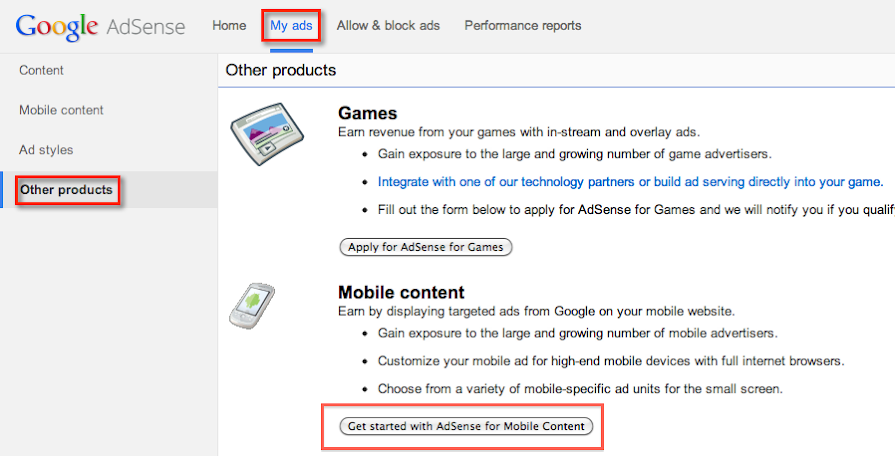
To generate your AdSense for mobile ad code, follow these steps:
  1. Sign in to your account.
  2. Visit the My ads tab.
  3. From the sidebar, choose Other products.
  4. Click Get started with AdSense for mobile content in the window that appears.

    Get AFM code
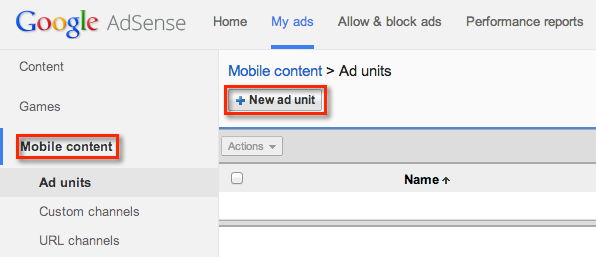
  5. Then, click Mobile content tab which will appear in the sidebar on the left.
  6. Click +New ad unit.

    Create AFM ad unit
  7. Name and customize your ad unit, then click Save and get code.
  8. Copy and paste the code into the source of your mobile webpage in the location where you'd like ads to appear.
Once you've added the code to your page and saved your changes, relevant ads should appear within 48 hours.

Google AdSense Alternatives

If you were disabled from the program, here are some alternate programs you can try...
Media.net
Chitika
Kontera
Infolinks
Clicksor
Don't ever depend on AdSense as your main income source. Diversify and learn to make money in other ways.

Got Questions?

I'd love to chat with you in my forum where we have tons of discussions about AdSense going on. Register and start chatting with us today!

Make More With AdSense By Creating Niche Websites

One of the keys to succeeding with AdSense is to build a niche website that targets a narrowly defined topic. This is the way I've been profiting with AdSense since 2003.
I can show you how to setup a niche website and I dedicate an entire chapter to AdSense and earning strategies in my book, Niche Website Success.

Protecting Your AdSense Account

It’s a fear many Webmasters have — getting pulled from AdSense for fraudulent clicks or other activity deemed “against AdSense TOCs”.
The fear is pretty valid. I’ve heard of people getting pulled from the program for “no apparent reason” (according to them).
Of course there are two sides to every story, but it reinforces that Google’s #1 interest is protecting their advertisers, not you, the publisher.
And rightfully so.
Google watches AdSense accounts like a hawk, especially if you’re a new member.
They track IP addresses and monitor for fraudulent clicks on a regular basis. A friend of mine clicked her own ads and was removed from the program within 2 days of joining.
While I have no fool-proof way to ensure your account won’t get dinged, here are some tips to keep you in good graces with Google.

1. Report Accidental Clicks

If you accidentally click on your own ads (and people have done this), the best thing to do is report it to Google immediately. In fact, Google even advises you to do this.
If you’re honest and upfront about it, Google probably won’t remove you from the program. Your account may get flagged temporarily and/or you may lose some revenue, but it’s better you report it than having them find out about it.
Just make sure this doesn’t become a habit.

2. Stop Telling Your Friends & Family to Click on Your Ads

Some people join Adsense with the intent of getting rich by having their friends and family click on their ads. While you may think this is pretty fool-proof idea, it’s not very smart or ethical.
First of all, advertisers pay for those ads through the AdWords program. So when you tell people to randomly click the ads, you are throwing their hard-earned money down the toilet. In a way, it’s stealing.
Second, what if Google notices the multiple clicks from the same IP address. Yes, maybe it’s not your IP address, but is it really worth the risk? Plus, I would imagine Google would eventually ignore those clicks anyway.

3. When Google Calls…. Answer… And Keep Your Records

Some thieves are not too bright. Once I caught someone who literally ripped off my entire site. Not only did they forget to remove my AdSense code, but they violated the AdSense T&C’s by calling attention to the ads.
Google discovered this site, and because the person was using my AdSense code, they contacted me because they thought it was my site. I explained to them what happened.
After I replied, I didn’t hear back from Google and that made me a little nervous. So I contacted them again and included the previous correspondence.
This time I received an answer and Google told me they added a note to my file that said I was not the owner of the domain that violated the T&C’s. More importantly, I saved this reply for my own records just in case.

4. Obey The Rules

Even though Google doesn’t seem to be enforcing this much, they recently added a section to their T&C’s that require any site that uses AdSense to have a Privacy Policy. See the end of Section 1 of their terms and conditions.
Many Webmasters aren’t taking this too seriously, but if it’s in their T&C’s then why not take 10 minutes to set it up?
————-
A lot of people feel Google owes them something or they are doing Google a big favor by being an AdSense publisher.
I have no way of knowing how AdSense affects Google’s bottom line, but I can tell you this. Thousands of advertisers are paying to advertise with Google through AdWords, and we know that’s where Google is making its money.
AdWords advertisers funnel thousands of dollars into Google everyday and indirectly earning you money from AdSense. Google’s best interest is keeping them happy, not the publishers. Remember, AdSense publishers aren’t paying Google a cent.
So the next time you try to sneak a click or encourage your visitors to click an ad or two, ask yourself if the 12 cents you’ll gain is worth losing your account for good.

Total Pageviews